Tanker Defense
Flares out! Defend an aerial refueling tanker: read the radar scope, pick the right countermeasure, call in an escort, and decide when the receiver has to break away.
iPhone and iPad
 Android
About Tanker Defense
You're the defensive systems operator on an aerial refueling tanker.
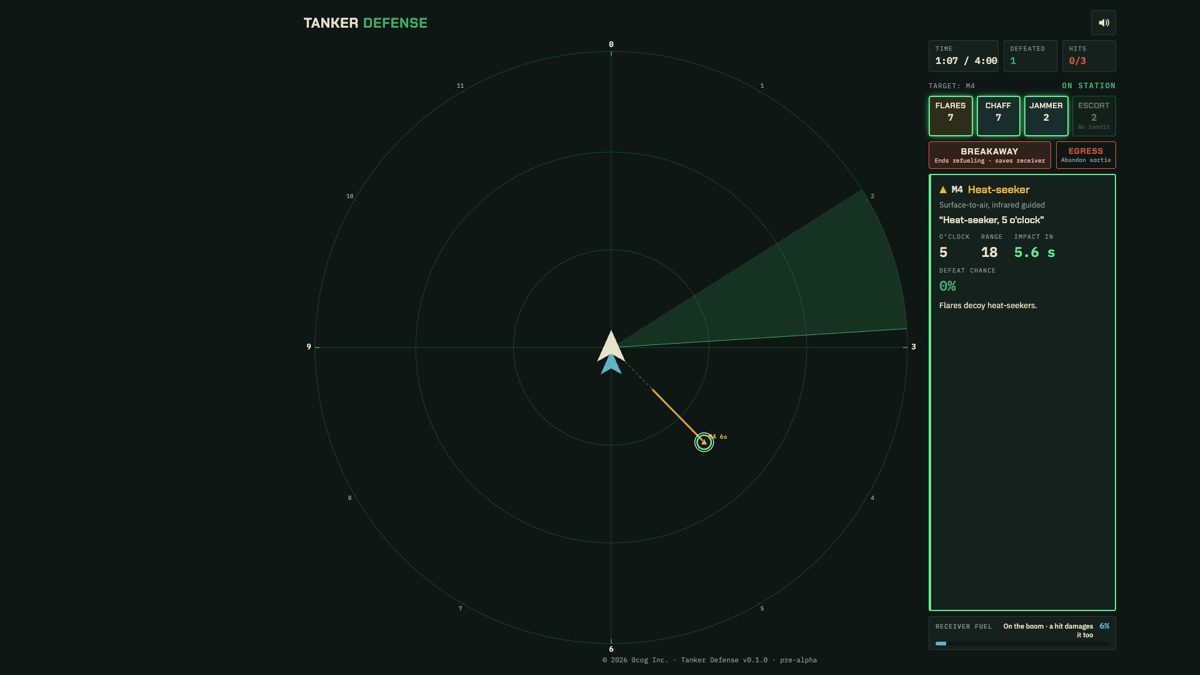
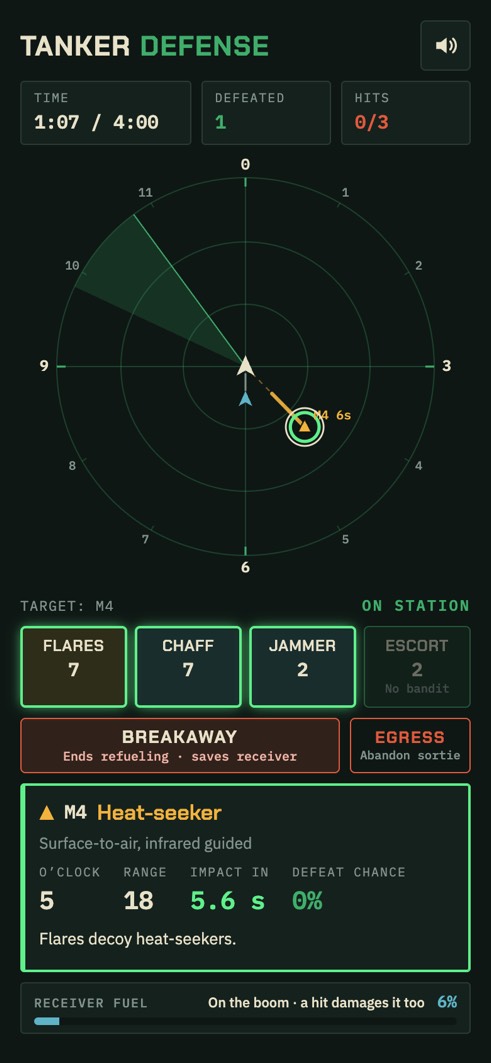
Missiles appear on your radar scope with their clock position, and your crew calls them out: "Bandit, 2 o'clock." Tap one to identify it, then answer it with the right countermeasure: flares for heat-seekers, chaff and the jammer for radar-guided missiles. Timing is everything. Each missile starts yellow while it's still too far out, turns green when it's time to fire, and red when it's too late. Or call in an escort fighter to splash a bandit before it can fire; leave a bandit alone and it may come back for another run. Your stock is limited, and some missiles stay unknown until the last few seconds.
While a receiver aircraft is on the boom taking fuel, a hit damages it too. Calling BREAKAWAY sends it clear, but it takes three seconds and ends the refueling, and the fuel you didn't deliver costs you. Storm fronts drift across the scope, painted like a weather radar: fly into a red core with a receiver on the boom and it counts as a hit, so break away while you're in its yellow ring for the full bonus, or in the rain beside it for half. Take a third hit and you have five seconds to EGRESS: the tanker is lost, but bail out within two seconds and the crew gets home unhurt.
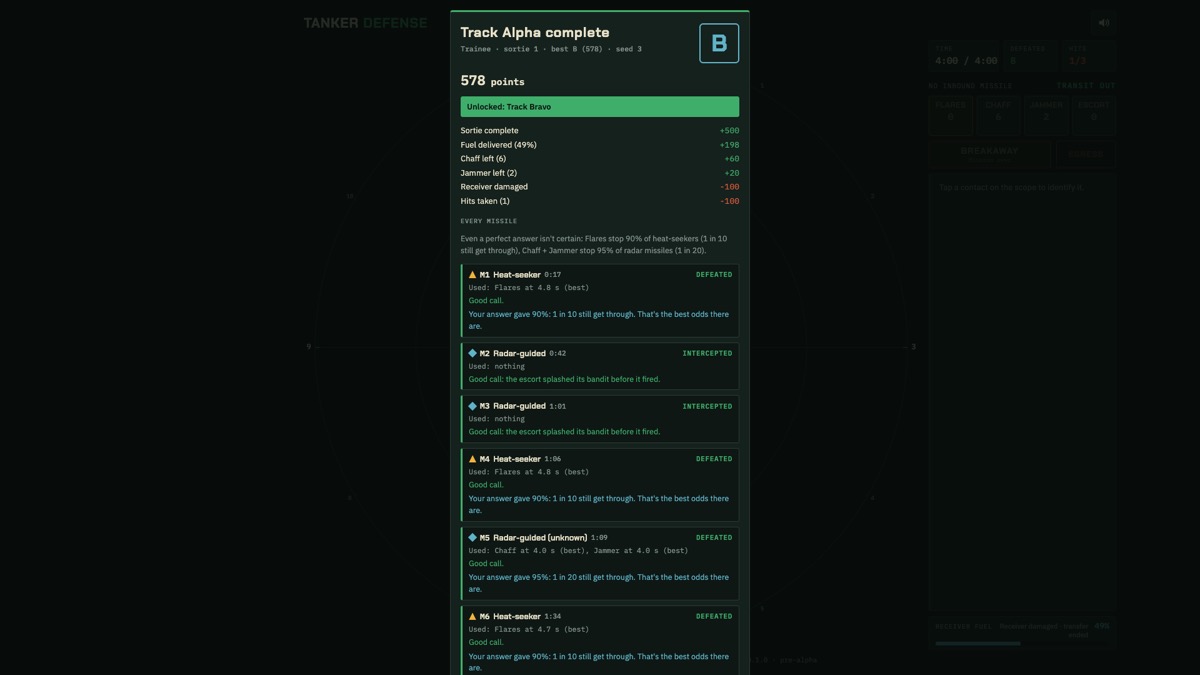
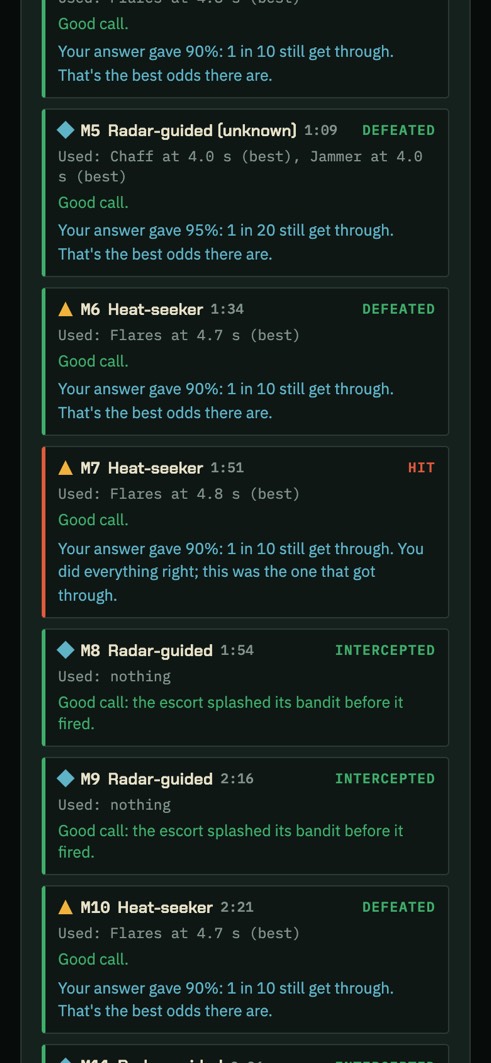
Four sorties, each with a new series of threats and a new storm every time: one receiver, two receivers back to back, a heavy storm, and a night run with the radar in quiet mode. Every sortie ends with a graded debrief: each missile, what you did and when, how it went, and the best answer, plus a verdict on every breakaway and egress. Trainee mode adds suggestions, the odds of every answer (even a perfect one isn't certain), a slower clock and an instructor's notes on your first run. Crew mode gives you none of that.
Tanker Defense is on the App Store for iPhone and iPad and on Google Play for Android, with haptics for every launch, hit and countermeasure, and plays free in your browser, on a phone in portrait or a computer in landscape, where it installs to your home screen and plays offline.
Features
- A radar scope with clock positions, and a crew voice calling each contact: "Bogey, 7 o'clock"
- Heat-seekers, radar-guided missiles with their launching fighters, and unknowns identified at the last moment
- Flares, chaff and a recharging jammer, with limited stock. Every missile turns yellow, green or red to show when to fire
- Call in an escort to splash a bandit before it fires, or it may come back for another run
- The breakaway decision: keep refueling, or send the receiver clear of a missile or a storm you can't avoid. After a third hit, five seconds to bail out
- Several storm fronts every sortie, drawn like a weather radar: green rain, and a yellow ring that warns of a red core
- Four sorties, a new threat series every run, and a graded debrief with the odds for every missile and a verdict on every breakaway
- On the App Store for iPhone and iPad and on Google Play for Android, with haptics for every launch, hit and countermeasure, and free in your browser
- Sound with real takeoff, landing and approach recordings. Installs to your home screen and plays offline. No accounts, no ads, and nothing leaves your device
Help
Reading the scope
The scope is the radar view from your tanker, with its nose at the top. Every contact shows with its clock position: 12 o'clock is dead ahead, 3 to the right, 6 behind, 9 to the left.
Triangles are heat-seekers, diamonds radar-guided missiles, and squares missiles not identified yet; enemy fighters are called bandits. Tap a contact to open its card below the scope: what it is, its range and the time to impact.
When and what to fire
Each missile's ring is yellow while it's still too far out, turns green when it's time to fire, and red when it's too late. Answer a heat-seeker with FLARES, and a radar-guided missile with CHAFF or the JAMMER; using both on a radar missile gives the best odds.
The buttons act on the contact you selected, or else on the missile closest to impact. Your stock is limited and the jammer needs time to recharge, so don't spend them while the ring is yellow. Unidentified missiles are named in their last few seconds. On a computer, F, C and J work too.
Bandits and the escort
A bandit is an enemy fighter that fires missiles at you. ESCORT (E on a computer) sends your escort fighter to splash it before it fires. Leave a bandit alone and it may come back for another run. Escorts are limited too.
BREAKAWAY and storm fronts
On station, a receiver aircraft takes fuel on the boom, and a hit damages it too. BREAKAWAY (B) sends it clear in 3 seconds but ends the refueling, and the fuel not delivered costs points: call it when a missile can't be stopped.
Storm fronts cross the scope like a weather radar: green rain, a yellow ring, a red core. A red core over the tanker with a receiver on the boom counts as a hit. Break away while you're in the yellow for +300, or in the rain beside a red core for +150. The receiver line warns you 8 seconds before red reaches the tanker.
Three hits: EGRESS
The third hit ends the sortie, and you have 5 seconds to press EGRESS (G): the tanker is lost, but within 2 seconds the crew gets home unhurt. Before the third hit, pressing EGRESS twice abandons the sortie.
No sound or no vibration?
The speaker button at the top right turns the sound on and off. In the iPhone and iPad app, the game plays even with the silent switch on, mixed with your music: check the volume.
The apps vibrate for every launch, hit and countermeasure when System Haptics is on (iPhone: Settings › Sounds & Haptics) or touch feedback is on (Android). iPhones don't vibrate for web pages, so the browser game can't. The crew's voice callouts use your device's own text-to-speech voices, so how they sound depends on the device.
No crew voice?
The crew voice callouts ("Bandit, 2 o'clock") are spoken by your device's own text-to-speech, offline. Turn them on with Crew voice callouts in the menu. If that option is greyed out or missing, the device needs an English speech voice first.
In the Android app: tap Set up a voice under the option, or open Settings and search for Text-to-speech output. Under Preferred engine, choose Speech Recognition & Synthesis from Google; if it isn't there, install it free from Google Play first. Then come back to the game and the option turns on.
On iPhone or iPad: Settings › Accessibility › Spoken Content › Voices › English, and download a voice.
In the browser: the voice uses the voices your computer or phone already has. If none is offered, add an English voice in your system's speech or accessibility settings.
Your progress
Sorties flown, your best grade for each sortie and difficulty, and your settings are saved only on your device. Deleting the app, or clearing the site's data in your browser, resets them.